Built for government forms, India-first

The form was in English. अब यह आपकी भाषा में है।

Upload a PDF and get it back in any of 34 languages with the layout untouched. Same boxes, same headings, every line redrawn in its place. Correct Devanagari and Gurmukhi shaping, no API key needed.

Translate your PDF Free, no sign-up, files deleted right after
Google, free no key needed
No PDF handy? Try a sample form
Keeps the layout

Drag the divider. Only the words change.

Most translators hand you a wall of text. This one rebuilds the original page, boxes, headings, dotted fields and all, then drops the translation into the exact same spots.

Government of India, Ministry of Rural Development

Application Form

For registration under the rural housing assistance scheme
Full name
Anita Sharma
Date of birth
14 / 08 / 1991
Gender
Female
Residential address
22, Gandhi Marg, Sector 5
District
Jaipur
State
Rajasthan
Aadhaar number
XXXX XXXX 4471
Declaration: I hereby declare that the information given above is true to the best of my knowledge.
भारत सरकार, ग्रामीण विकास मंत्रालय

आवेदन पत्र

ग्रामीण आवास सहायता योजना के तहत पंजीकरण हेतु
पूरा नाम
अनीता शर्मा
जन्म तिथि
14 / 08 / 1991
लिंग
महिला
आवासीय पता
22, गांधी मार्ग, सेक्टर 5
जिला
जयपुर
राज्य
राजस्थान
आधार संख्या
XXXX XXXX 4471
घोषणा: मैं एतद्द्वारा घोषणा करती हूँ कि ऊपर दी गई जानकारी मेरी जानकारी के अनुसार सत्य है।
English, original
हिन्दी, translated
34
languages, 13 of them Indian
0
API keys or sign-ups required
PDF
in, same PDF out, layout intact
OCR
reads scanned forms too
Under the hood

Honest about how it works.

1

Read the page

Native PDF text is pulled directly. Pages that are scans get on-device OCR, so image-only forms still translate.

2

Translate in place

Each text block is sent to Google (free and keyless by default) and dropped back at its original geometry, auto-fit to the box.

3

Shape and rebuild

HarfBuzz shapes complex scripts so matras and conjuncts render correctly. Edit any block and regenerate, then export PDF, DOCX or TXT.

34 languages, India-first

Your language, shaped correctly.

Right-to-left scripts get mirrored direction, and Indic scripts get real shaping, not the broken disconnected glyphs most web tools produce.

हिन्दीবাংলাਪੰਜਾਬੀ தமிழ்తెలుగుಕನ್ನಡ മലയാളംગુજરાતીଓଡ଼ିଆ मराठीঅসমীয়াاردو العربيةעבריתفارسی English中文日本語한국어 FrançaisDeutschEspañolРусский and 11 more
Prefer to work offline?

Get the desktop app.

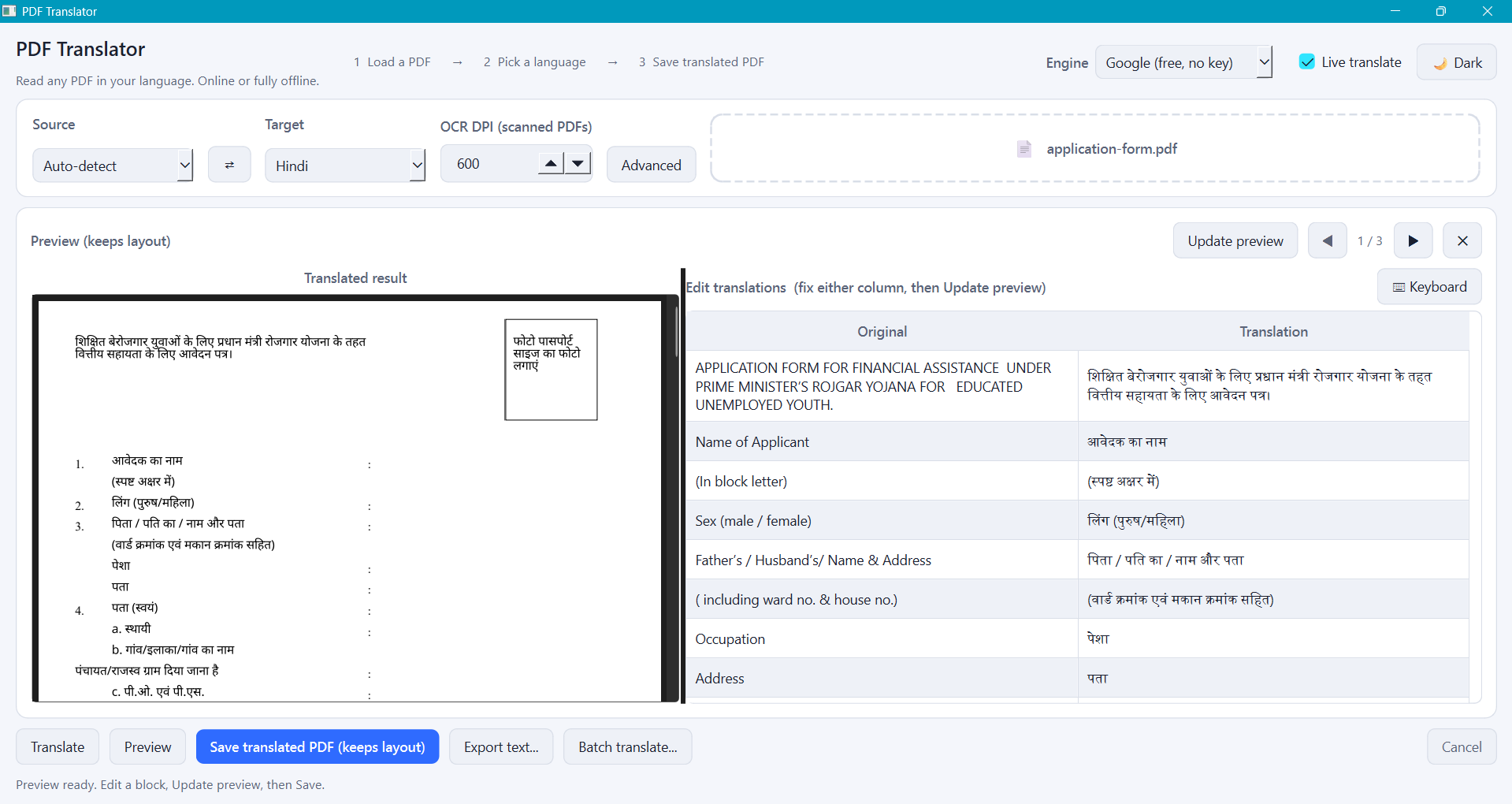
The browser handles the everyday case. The Windows app adds what only a desktop can.

  • Fully offline translation with Argos, nothing leaves your machine
  • On-screen keyboards for 13 Indian scripts
  • Live side-by-side editing with dark and light themes
Download for Windows
PDF Translator desktop app showing a form translated into Hindi with side-by-side preview
the same engine, on your machine
Questions

Good to know.

Is it really free?

Yes. The default engine uses Google's keyless endpoint, so there is no sign-up, no billing and no API key. If you process a lot of documents you can paste your own Google Cloud key for higher limits, and that key stays on the server.

What happens to my file?

It is processed in a temporary folder and deleted the moment your download is ready. Nothing is stored or logged. The free path is rate-limited so it stays available for everyone.

Does it work on scanned PDFs?

Yes. Pages with no selectable text are read with OCR, the original text is painted over, and the translation is drawn in its place. Clean scans work best.

Which file types can I export?

The layout-preserving result comes back as a PDF. You can also export plain reflowed text as DOCX or TXT, and translate several files in one batch.

Will the translation be perfect?

Machine translation gets you most of the way, fast. For anything official, review it. You can edit any block in the preview and regenerate, so corrections flow straight into the saved PDF.
Privacy

Your form is nobody's business.

Files are processed in a temporary folder and deleted the moment your download is ready, so nothing is stored or logged. The free path is rate-limited to keep it available for everyone, and if you bring your own Google API key it stays on the server, never in your browser.